SNAP - 06 (Introduction to Variables)
OPENING QUESTIONS: Please recollect back to your dim dark days of Algebra 1 when you first encountered the term 'variable' in math class.
What does the term 'variable' mean in math?
How do you suppose we use the 'variable' in computer programming??
OBJECTIVES:
- I will be able to use the
 system variable to store user input after today's class
 - I will be able to use the
 operator to join variables and/or text together after today's class
 - I will be able to use the
 operator to compare text after today's class
WORDS FOR TODAY:
- variable (a user-defined data bucket)
- system variable (a data bucket provided by SNAP)
TIPS O' THE DAY:
1) ALWAYS have a 'clear' button (  ) on hand... it makes clearing the screen much easier than having to hunt for it.
2) You can also 'delete' a script by dragging it off the scripting area
3) If you know the name of a block but can't remember where it is, use the ALWAYS helpful ctrl-F key (that works on web sites AND pdf documents by the way)
4) How can you *duplicate* a script or part of a script (this will be VERY helpful in today's lab)
5) Always a good idea to have an x 'go to 0' and a y 'go to 0' to re-center your sprite if it get's lost
6) Right Mouse click on the stage and select 'show all' to bring sprite(s) back
WORK O' THE DAY:
Please have a conversation with your group (DO NOT check your notes quite yet, please). And list as many of our "BEST PRACTICES" from last week that you can come up with.
Now go check your notes.
Now close your notes.
Now make another list.
How did you do the second time?
LET's discuss!
═══════════════════════════
Every time we sit down to use a computer at school we have to logon. Most of us don't give that process a second thought. That is to say we logon, the computer network (hopefully) checks our logon (we often call those our 'credentials') against the logon on file in the system database. If they match, we get into the school system. If they don't, we don't.
Consider the following short script in SNAP... please turn to the person next to you and describe what that code does.
In particular:
1) Take a moment to identify the 'system variable' in the program
2) Explain to your partner why that term is a "SYSTEM" variable
═══════════════════════════
ANY time that you use the "ask" block, SNAP will prompt your user to input data from the keyboard.
ANYthing that your user types in will be saved in the SYSTEM VARIABLE named "answer"
More generally, a VARIABLE is a place holder, or better yet a bucket that holds data inside SNAP until your program is ready to use it.
Variables are one of the most important aspects of computer program.
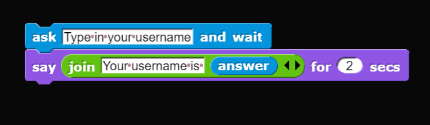
Take a look at THIS somewhat more 'user friendly' code:
═══════════════════════════
The
- You can put the
- You can type in words or phrases into each of those boxes
- you can put your own variables in there too (of course you don't know how to create your own variable....yet)
═══════════════════════════
Have a conversation with your group and suggest what the output of that code will be.
Now please suggest a reason why I'm saying that code is more 'user friendly'.
Do you agree or disagree? Why?
- Now please write that code in SNAP but put in your OWN values when you use the
- Make sure that it works
═══════════════════════════
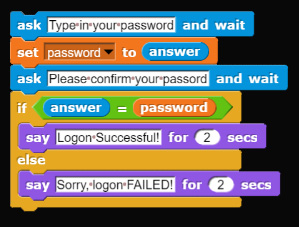
Here's a script that is somewhat more complicated:
Please work with your team to reproduce this program a brand new script in snap:
- You'll have to figure out how to create your own variable
- You'll also have to figure out how to use the
If time permits, we'll practice creating more variables, using the equal operator (
- Save the program as logon01
- Make a copy as logon01_SAFE and save that
- Go back to work on logon01 (note that when you make a backup SNAP assumes you want to continue working on the backup, NOT the original)